
Showing posts with label 1 minute video. Show all posts
Shots and Angles the Video Edition by Francine

This assignment is where we learned about shots in videos and how similar they are to the photos. While working on this, I had a lot of fun editing and filming it.
Shots and Angles Video Edition By Nicole
Shots and angle:video edition by jam
SHOTS AND ANGLES: VIDEO EDITION
This assignment is about making a video tutorial. We can chose any topic that we want to do. What i did was how to bake brownies because i love baking brownies. This is our first time making a video, a movie this year. We had to learn how to make a movie, it was hard for me because this is my first time doing this. But I am glad that we did this because I can make other movies myself.
Shots and Angles Video Edition
This assignment taught us the many different shots and angles that can be used while shooting a video, we were challenged to express what we've learned by creating a simple how-to video that is around one minute long.Shots and Angles the Vidoe Edition By: Frans
Following our very first assignment - Shots and Angles, our current assingment is the video edition. Most of the definitions were similar, therefore we already had some insight on this assingment. Our primary task was to make a 1 minute how-to video by using the definitions we learned, and incorporating it. But, as always, we were ordered to watch multiple videos on the definitions and how to use Adobe Premier. My main topic was how to fold a shirt the fastest way. During production, I implanted 2 types of shot sequences, Perspective Shift and Same Frame Game. In conclusion, we were demanded to make 1 minute short videos. For now, enjoy watching my video.Shots and Angles the Video Edition By: Cielo

Hello, I’m back with a new assignment! This time it was a shots and angles but video edition. We got to choose our own topic for the video. Mr. Harbeck first told us to do some research about the types of shots and sequences we can capture to make video, and we made definitions for them in our slide deck. Then, we created a storyboard to help visualize our video and so we know what type of shot to film. Once we finished filming, we soon edited on Abobe Premier. This was very new to some of us, and we learned through videos that Mr. Harbeck provided. Although, the editing was a little tricky and hard to handle, as you worked with it more it became to be more easier and you got use to it. This assignment was really new and unique since we usually take pictures and now we enhanced the work of video through the lens.
Allyza's 1 Minute Video Tutorial
Shots And Angles Video Edition By:Chris

Shots and Angles Video Edition by Maegan
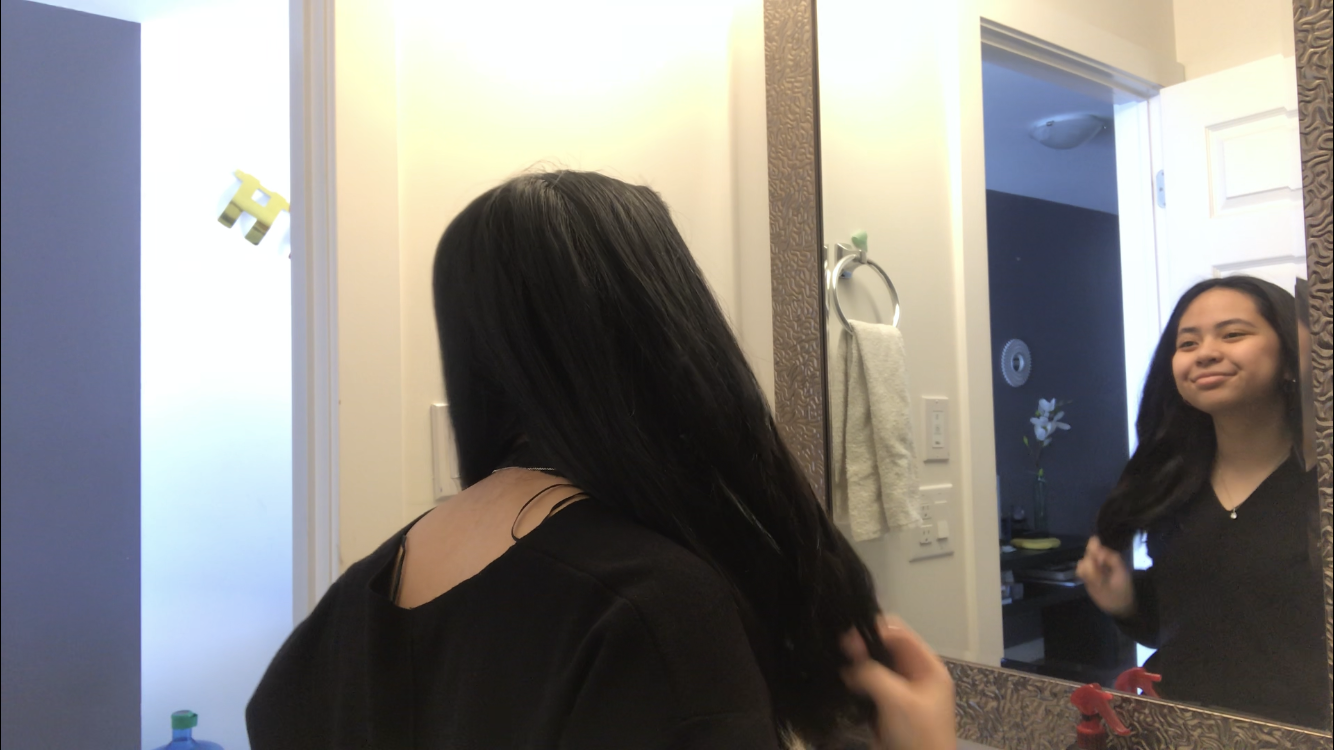
Cinematography is something that I personally have gotten into around 3 years ago in grade 7. Looking back, although my work was most definitely amateur and imperfect, I have established basic knowledge on various shots and angles using videos. As we initially delved into cinematography last term, I was able to expand my knowledge in order to create a 1 minute "how-to" video on curling hair. Through this process, I was able to discover more types of shots and angles such as the POV shot, the over the shoulder shot and the extreme close up. We were also introduced to 10 different kinds of shot sequences which I definitely enjoyed exploring. For my video, I was particularly fond of using the POV shot, Perspective Shift and Match on Reaction to portray a certain plot. It was very tricky to achieve these shots because everything had to correspond to previous shots. If something was out of place, if the lighting wasn't the same or if I didn't execute the movement close enough to previous shots, the overall progression of the video would look odd. The video would also not have turned out if it weren't for editing which admittedly, was a bit of a bumpy process for me as I have never used Adobe Premier before. Nevertheless, this was an overall enjoyable experience and I have learned quite a lot regarding filming and editing. I hope to carry on what I've learned in the future videos I may create.
Shots and Angles the Video Edition

Define the following
Video concepts and what they are good for.
\
Storyboard for Video
Subscribe to:
Posts
(
Atom
)
Popular Posts
-
I chose Macro Photography for my second assignment in term three. I chose this assignment because i wanted to take pictures of the s...
-
The GCT class of 2018-2019 had 1 class to take photos of each other for this project on how to take good portrait photos. We used that class...
-
The topic of this assignment was Alphabet Photography. Alphabet photography captures a letter in the alphabet naturally or ...
-
 The Grade 9 GCT class has received a new assignment. This assignment that I present to you is based on capturing motion with our camer...
 -
Welcome World. Here is my first GCT assingment on Blogger https://www.publicdomainpictures.net/pictures/110000/velka/bowl-of-ri...
-
 In this assignment we were assigned to learn and complete at least 3 different composition shots like line, sub-framing, and etc....
 -
https://www.alphabetphotography.com/i/fp/traditional.jpg In GCT we were given a variety of assignments. I chose to tackle alphabet ...
-
 https://www.flickr.com/photos/katirae/2759175776 A B C D ..... now I know my ABC's won't you come and see them with me! Your ne...
 -
In this GCT assignment we were to master at least 3 composition types and learn new compositions in these images as well as the way to take...
Popular Posts
-
I chose Macro Photography for my second assignment in term three. I chose this assignment because i wanted to take pictures of the s...
-
The GCT class of 2018-2019 had 1 class to take photos of each other for this project on how to take good portrait photos. We used that class...
-
The topic of this assignment was Alphabet Photography. Alphabet photography captures a letter in the alphabet naturally or ...
-
The Grade 9 GCT class has received a new assignment. This assignment that I present to you is based on capturing motion with our camer...
-
Welcome World. Here is my first GCT assingment on Blogger https://www.publicdomainpictures.net/pictures/110000/velka/bowl-of-ri...
-
In this assignment we were assigned to learn and complete at least 3 different composition shots like line, sub-framing, and etc....
-
https://www.alphabetphotography.com/i/fp/traditional.jpg In GCT we were given a variety of assignments. I chose to tackle alphabet ...
-
https://www.flickr.com/photos/katirae/2759175776 A B C D ..... now I know my ABC's won't you come and see them with me! Your ne...
-
In this GCT assignment we were to master at least 3 composition types and learn new compositions in these images as well as the way to take...
Popular Posts
-
I chose Macro Photography for my second assignment in term three. I chose this assignment because i wanted to take pictures of the s...
-
The GCT class of 2018-2019 had 1 class to take photos of each other for this project on how to take good portrait photos. We used that class...
-
The topic of this assignment was Alphabet Photography. Alphabet photography captures a letter in the alphabet naturally or ...
-
The Grade 9 GCT class has received a new assignment. This assignment that I present to you is based on capturing motion with our camer...
-
Welcome World. Here is my first GCT assingment on Blogger https://www.publicdomainpictures.net/pictures/110000/velka/bowl-of-ri...
-
In this assignment we were assigned to learn and complete at least 3 different composition shots like line, sub-framing, and etc....
-
https://www.alphabetphotography.com/i/fp/traditional.jpg In GCT we were given a variety of assignments. I chose to tackle alphabet ...
-
https://www.flickr.com/photos/katirae/2759175776 A B C D ..... now I know my ABC's won't you come and see them with me! Your ne...
-
In this GCT assignment we were to master at least 3 composition types and learn new compositions in these images as well as the way to take...